

Thermal paste helps move heat across the contact surface between a CPU and its cooler. The outcome depends on the clamping force, surface condition, and the thickness of the paste film. It sits between the processor and the cooler, filling microscopic gaps that would otherwise trap air. This article focuses only on the interface layer, not the entire cooling system or performance rankings.
Thermal paste role at the interface
Thermal paste reduces thermal resistance by filling tiny voids at the interface. Its effectiveness depends on achieving void-free coverage under mounting pressure. A cooler can only remove heat if the heat can first cross the contact plane between the cooler and the processor. Thermal paste acts as a gap-filling layer, creating a thin, continuous thermal path across this contact area.
This paste works best as a thin film, not a thick layer. The ideal film thickness depends on the flatness and micro-roughness of the surfaces. Too little paste can leave air pockets. Too much paste can increase the distance heat must travel. The goal is simple: eliminate air gaps while keeping the paste layer as thin as possible.
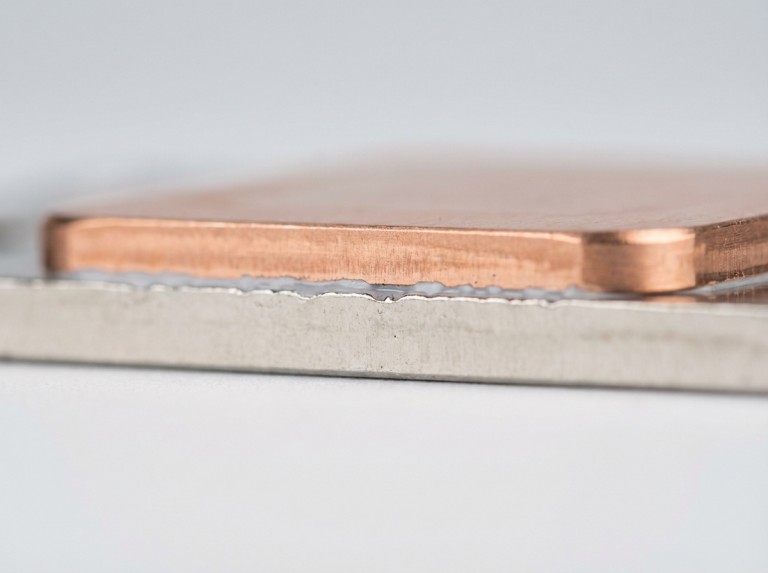
Why “flat” metal surfaces still need a paste layer?
Even when you clamp two “flat” metal surfaces together, they still contain voids. The volume of these voids depends on surface roughness and how pressure is distributed. Machined surfaces have microscopic peaks and valleys that prevent full contact. Air trapped in these valleys blocks heat flow, making the interface a bottleneck.
Mounting pressure determines how much the paste spreads into these voids. This result depends on the bracket design and the tightening sequence. Uneven tightening can tilt the cooler base, pushing paste away from high-heat areas. We treat mounting as a critical part of the thermal design, not just a final step.
What thermal paste does not do
Thermal paste does not create cooling on its own. Any perceived improvements come from fixing a problem at the interface, not from changing airflow or heatsink capacity. It cannot make up for a loose mount, warped surfaces, or dirt that prevents good contact. The quality of the paste matters less than proper interface control when mounting pressure or surface condition is the real issue, regardless of paste choice.
Thermal paste is not a glue. The mounting hardware provides the mechanical strength to hold everything in place. You should not use paste to fill a large gap caused by improper parts. Doing so makes the interface thickness uncontrolled. We prevent misuse by keeping thermal paste only on the intended contact plane.
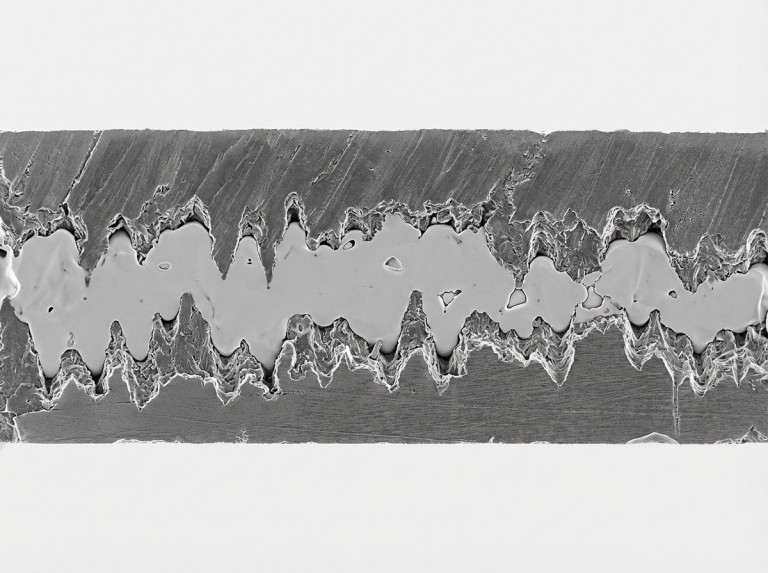
How to verify thermal paste is doing its job?
You can verify thermal paste performance in a computer cooling interface with interface checks instead of guessing. This process looks at symptoms, mounting stability, and uses a repeatable inspection method. Verification should start with checking the seating and clamp consistency, as poor contact can look like “bad paste.” We use checks that connect variables to things we can see.
A short verification checklist is enough for most builds:
- Verify both contact surfaces are clean and dry, as residue creates voids.
- Verify the cooler is seated without rocking, because any tilt changes the pressure.
- Verify tightening is balanced, as uneven pressure can push paste from hotspots.
- Verify the interface was not disturbed after mounting, as remounting can add dirt.
If you must open the interface for troubleshooting, look at the imprint pattern carefully. A patchy imprint could mean uneven pressure or contamination, not just the wrong amount of paste. We address problems in order: seating, pressure, cleanliness, and then the paste amount.
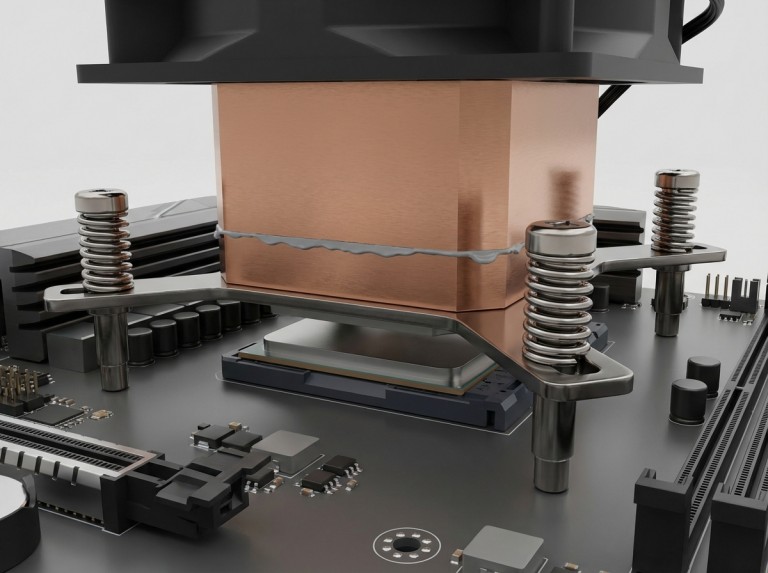
When thermal paste should be replaced?
You should replace thermal paste mainly when the interface is disrupted. This need arises after removing the cooler, if there is a risk of contamination, or due to its thermal history. Removing a cooler usually ruins the film’s uniformity. Cleaning and reapplying the paste is the best way to reset the interface. We decide on replacement timing based on the interface’s state, not a fixed schedule.
Pastes can age, but not all age in the same way. Long-term behavior depends on temperature swings and mounting pressure. A rising temperature trend can have many causes. You should verify the interface condition before assuming the paste has aged. We prevent unnecessary work by checking seating, pressure, and cleanliness before repasting.
Conclusion
Thermal paste improves cooling by controlling interface variables. The outcome depends on surface condition, mounting pressure, and thin-film continuity. It works by pushing out air pockets and supporting a stable thermal path across the contact plane. Troubleshooting is most effective when it follows the same variables that drive the interface.
At Trumonytechs, we work with thermal interface materials. We see thermal paste as a requirement that needs a practical acceptance method. We clarify risks early, verify mounting assumptions, and align our process to real-world limits like pressure and contamination control. Results depend on the variables in the assembly, so decisions should be verified, not assumed.
We recommend a disciplined next step before changing anything: verify surface cleanliness, even clamp pressure, and that the interface was not disturbed. If a repaste is needed, document the mounting method to target the true variable. Share your CPU/GPU type, cooler style, and verification method, and we can help you find an approach that fits your interface.
FAQ
What does thermal paste do between a CPU and a cooler?
Thermal paste fills microscopic gaps between the CPU and cooler to reduce trapped air. The results depend on clamp force, surface flatness, and paste thickness. It creates a thin, continuous path for heat to travel across the contact plane but does not replace correct mounting.
Is thermal paste required if the cooler has pre-applied material?
Pre-applied material can be fine for a single, clean installation. Its adequacy depends on storage conditions and whether the cooler was removed. A disturbed interface usually needs cleaning and a fresh application to create a controlled film. You should verify its suitability by checking the seating and pressure.
Does the application pattern matter for what thermal paste does?
The application pattern matters less than the final compressed film quality. A good film avoids voids and maintains a controlled thickness under pressure. Different patterns can work if the hotspot region ends up covered by a thin, continuous film. You should verify outcomes with interface checks, not by debating patterns.
How can someone tell thermal paste is not working as intended?
Thermal paste issues often appear as interface instability. Diagnosis depends on first confirming proper seating, pressure distribution, and cleanliness. A poor mount can look like “bad paste” even with fresh material. Verification should follow a repeatable process: seat, tighten evenly, then assess.
Should thermal paste be replaced after removing the cooler?
Yes, it is common to replace thermal paste after removing the cooler because the film uniformity changes. Layering new paste over old paste creates more uncertainty with voids and thickness. Replacement is a control step that restores a predictable interface.